Automation of business means using software to carry out repetitive, rule-based work, such as sending invoices, routing approvals or updating records, so that people step in only when judgment is needed. Instead of someone copying a figure from an email into a spreadsheet, a trigger fires, a rule runs, and the system completes the step and logs it.
This article explains why automation matters, how to apply it to your own processes step by step, which technologies exist and how they differ, and what automation looks like in finance, sales, HR, IT and freight. It also covers the costs, risks and mistakes that sink most first projects.
QuikeFix builds and hosts workflow automation, integrations, dashboards and operational software for South African businesses. The advice below reflects how these projects run in practice: start with one process, prove it works, then expand.
Why automation in business matters
Automation matters because manual, repetitive work is the most expensive kind of work a growing company does. It eats hours, invites mistakes and limits how much you can handle without hiring. Moving that work to software frees your people for exceptions, customers and decisions.
Time, accuracy and consistency
Every repeated task has a hidden cost. Someone re-keys a figure, forgets a follow-up or sends an outdated version of a document. Automation removes the re-keying and the forgetting, because the same rule runs the same way on the thousandth record as on the first.
Speed follows from that. A task that used to wait for someone to return from a meeting now runs the moment its trigger fires, even at 2 a.m. But consistency is the bigger gain, because it makes your processes predictable and easy to audit.
The real value of automation is that routine work happens the same way every time, without anyone having to remember it.
A worked example with numbers
Say your company processes 200 supplier invoices a month, and each takes 6 minutes to capture, check and post. That is 20 hours of work. If automation captures the data and matches invoices to orders, and 90% pass without a person touching them, only 20 exceptions remain. Those still take 6 minutes each, which is 2 hours. The table assumes R150 per hour of staff time, a figure you should replace with your own.

| Manual | Automated | |
|---|---|---|
| Invoices per month | 200 | 200 |
| Invoices handled by a person | 200 | 20 |
| Hours per month | 20 | 2 |
| Staff cost at R150 per hour | R3,000 | R300 |
That is 18 hours and R2,700 saved per month, or R32,400 a year, before setup and licence costs. Treat this as an illustration, not a promise. Real savings depend on data quality, process design, adoption and integration, which is why QuikeFix does not guarantee a fixed saving.
Growth and what happens to your people
Automation lets you take on more volume without matching it with headcount. If your shipments, orders or tickets double, an automated workflow handles the extra routine steps at close to the same effort. Your team scales through exceptions, not through repetition.
Roles do change, and you should say so openly. People stop doing data entry and start checking exceptions, talking to customers and improving the process. Involve the people who currently do the work. They know where the process really breaks, and they will either make the automation succeed or quietly work around it.
How to automate a business process step by step
To automate a process, pick one that is repetitive and rule-based, map how it runs today, build the stable part first, run a small pilot, then measure and expand. The order matters. Most failed projects skip the mapping and start by buying a tool.
Choose the right first process
A good first candidate has four traits. It runs often, it follows clear rules, it causes visible errors or delays, and one person owns it. Good starting points are invoice capture, lead follow-up, onboarding checklists, ticket routing and routine reporting.
Avoid processes that are rare, politically contested or still changing every month. Automating an unstable process simply produces unstable results faster. Also avoid the opposite trap, where you choose something so trivial that nobody notices the gain. A first project that returns real hours to a real team builds support for the next one.
Map the process and set a baseline
Before you build anything, write down how the work runs today and how long it takes. You need a baseline to prove later that automation helped. Copy this template and fill it in for your chosen process:
Process name:
Process owner:
Trigger (what starts it):
Inputs (forms, emails, files, systems):
Steps (who does what, in order):
Decision rules (if X, then Y):
Exceptions (what breaks the rules):
Volume per month:
Minutes per run:
Error rate or rework per month:
Target outcome (time, accuracy, response time):
The "exceptions" line is the one people skip. It is also where most of the design effort goes, because exceptions decide how much of the process you can really automate.
Build, pilot and scale
Automate the stable, rule-based core first and send everything else to a person. Run it on a small slice of real work for a few weeks, compare it with your baseline, and fix what the pilot exposes. Then widen the scope.
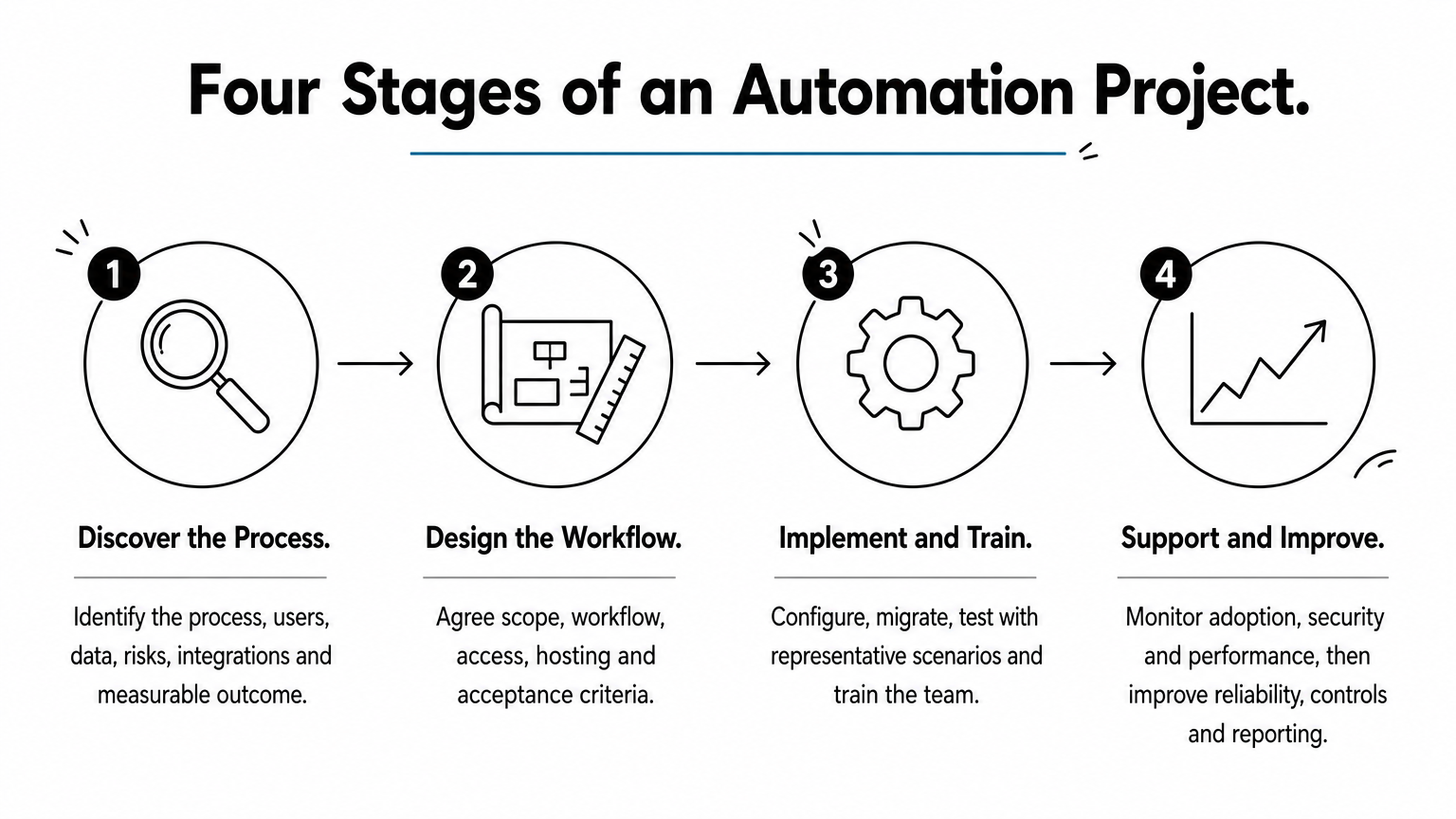
QuikeFix structures its projects in four stages that follow the same logic:
- Discover: identify the process, users, data, risks, integrations and the measurable outcome.
- Design: agree scope, workflow, access, hosting and acceptance criteria.
- Implement: configure, migrate, test with representative scenarios and train the team.
- Support and improve: monitor adoption, security and performance, then improve reliability, controls and reporting.
Map the process and measure it before you automate it, or you will never know whether the automation worked.
Business automation technologies and how they work
Business automation technology ranges from simple trigger-and-action workflows to AI systems that read documents and pursue goals. They are layers, not rivals. Most companies use two or three together, and the right one depends on how structured your data and rules are.
How an automated workflow runs
Almost every automation, from a one-step reminder to a full process, follows the same pattern. A trigger starts it, such as a form submission, a new email or a status change. Conditions check the rules, actions do the work in one or more systems, and exceptions route anything unusual to a person. Every run leaves a log so you can see what happened.
It helps to separate automation from digitization. Digitization converts paper or manual steps into digital form, for example scanning invoices. Automation then acts on that digital data without someone pushing it along. You usually need the first before the second pays off.
Types of business automation technology compared
The table sets the main types side by side, so you can match one to your problem.

| Technology | What it does | Best for | Example |
|---|---|---|---|
| Workflow automation | Connects apps and people, moving work between steps on triggers | Approvals, lead routing, onboarding | A web enquiry creates a CRM record and alerts sales |
| Business process automation | Runs a whole cross-department process end to end | Quote to cash, procurement | An approved order reserves stock and raises the invoice |
| Robotic process automation (RPA) | Software bots operate screens like a person | Legacy systems with no API | Copying data from an old system into accounting |
| API integration | Systems exchange data directly | Keeping systems in sync | Shipment status flows to a customer portal |
| Intelligent automation | Adds machine learning to read and classify unstructured data | Documents, emails, varied inputs | Extracting totals from supplier invoices in PDF |
| Agentic AI | Pursues a goal, plans steps and adapts | Open-ended, multi-system work | An agent researches a prospect and drafts outreach |
QuikeFix delivers several of these layers: n8n workflow automation, business process automation, API integration development, data reporting dashboards and custom business applications. Each is quoted against your environment, users and required outcome, not sold at a fixed public price.
What makes automation smart
Smart business automation is simply automation that can handle messy input and make bounded decisions. A rule-based workflow breaks when an invoice arrives in a new layout. An intelligent one reads it anyway and flags only what it is unsure about.
Do not start with AI by default. If a rule can solve it, use the rule. It is cheaper, easier to test and easier to explain to an auditor. Add AI where the input is genuinely unstructured, and keep a person in the loop for decisions with financial or legal consequences.
Use the simplest technology that handles your data, and add intelligence only where rules run out.
Business automation examples by department
Automation shows up in every department, and the pattern repeats: a trigger, a rule, an action and a human check for exceptions. The examples below are processes that companies of different sizes automate first.
Finance and administration
Finance carries the most repetitive work. Typical automations include invoice capture and matching, payment reminders for overdue accounts, expense approval routing, bank reconciliation and monthly reporting. A dashboard that pulls figures from your systems replaces the end-of-month copy-and-paste exercise.
The pattern for each is the same. The system does the matching and chasing, and a person reviews only mismatches, disputed amounts and approvals above a set limit.
Sales, marketing and customer service
A new enquiry arrives from your website or an email. Automation creates the CRM record, assigns it to the right salesperson and sends an acknowledgement. If nobody responds within a set time, it escalates. Support teams use the same logic to route tickets by topic and urgency and to alert a manager before a service-level target is missed.
Marketing automation sends follow-up emails based on what a contact did, such as downloading a price list or requesting a quote. The rule: automate the follow-up, not the relationship. A human should still handle anything that needs judgment or empathy.
HR and IT
Hiring and onboarding involve long checklists. Automation can create accounts, assign equipment requests, send policy documents for signature and remind managers of their tasks. Leave requests route to the right approver and update the calendar. In IT, monitoring tools raise alerts, create tickets and trigger routine tasks such as backups, so staff are not checking dashboards by hand.
Freight and logistics
Freight shows how connected automation gets. In QuikeFix Freight ERP, built for South African forwarding, clearing, transport and warehouse teams, a booking becomes a job, and the job carries milestones through collection, delivery and proof of delivery. In the warehouse, barcode tracking records chain of custody from security entry through receiving, stock, dispatcher release and security exit.
On the finance side, vendor invoices are reconciled against jobs, and estimated cost is compared with actual cost to show job-level margin. The system provides SARS-ready customs data, document and status controls. Direct electronic SARS integration is planned but not yet active, so customs submissions are not automated end to end today.
The best automation examples connect steps that used to live in separate tools, so work flows from one department to the next without retyping.
Risks, costs and how to choose a solution
The main risks are automating a broken process, starting too big and ignoring security. Costs depend on scope, and you should expect a quotation after discovery, not a price list. Choosing well means asking how a solution handles exceptions, integrations and support.
Common mistakes to avoid
Most disappointing projects fail for predictable reasons:
- Automating a bad process. Fix the process first, or you will automate the mess.
- Starting too big. A company-wide programme before one working pilot invites delays and resistance.
- No owner. Someone must be accountable for the rules, the exceptions and the results.
- Ignoring exceptions. If 30% of cases are unusual, plan for them from the first day.
- Poor data. Duplicated customers and inconsistent codes will break any automation.
- No follow-up. Rules go stale when the business changes, so review them regularly.
What automation costs and what to ask
Cost is driven by the number of users, the workflows and modules involved, the integrations with other systems, any data migration, and the level of ongoing support. That is why QuikeFix confirms pricing and scope during a consultation. It asks about users, modules, current systems, data, integrations and target date before it prepares a tailored estimate.
When you evaluate any automation business solution, ask:
- Does it connect to the systems you already use, through APIs or ready connectors?
- How are exceptions handled, and who sees them?
- Can you see a log of every run?
- Who maintains it when rules or systems change?
- Can you start with one process and add more later?
Security, compliance and continuity
Automations touch your most sensitive systems and data, so treat them as part of your security perimeter. Use role-based access, keep credentials in a secure store and keep audit logs. If your workflows handle personal information, the Protection of Personal Information Act (POPIA) applies to them just as it does to manual handling.
Continuity matters too. A workflow that stops when a server or a power supply fails creates a backlog. Running automation on reliable, monitored hosting, with backups, protects the processes your business now depends on.
Choose a solution you can start small with, see inside of, and keep secure as it grows.
Start with one process
Automation of business is not a single product. It is a habit of finding repetitive, rule-based work and handing it to software, with people kept for exceptions and judgment. The steps are simple: choose one process, map it, measure it, automate the stable core, pilot it and expand.
If you are unsure where to begin, pick the process that your team complains about most and that follows clear rules. Bring the template from this article, your volumes and a list of the systems involved. When you are ready to talk it through, you can request a consultation or demo with QuikeFix and map your first automation together.