Chasing a deal in one app, then tracking the project that deal creates in another, wastes hours every week and loses details in the gaps. That’s why so many operations managers now search for project management software crm platforms instead of running two disconnected systems. You want your sales pipeline and your project timelines talking to each other, without exporting spreadsheets or copying notes between tools.
This list covers nine tools that pair crm and project management software in one workspace, so you can move a client from quote to delivery without losing visibility along the way, and it builds on our wider look at CRM software examples and how businesses use them. Each option is built for teams that need task tracking, client records, and reporting under one login, not three.
We break down what each platform does well, who it suits, and where it falls short, so you can match the tool to your team size and budget. If you run operations across sales, service, and delivery, you’ll also see why a unified platform, like the approach QuikeFix takes with its unified business management platform, can outgrow a bolted-together CRM and project tracker as your business scales.
1. CRM vs project management software: what’s the difference
A CRM tracks people and revenue. It stores contact details, deal stages, email threads, and quote history so your sales team knows exactly where every prospect sits in the pipeline. Project management software tracks work. It stores tasks, deadlines, dependencies, and deliverables so your delivery team knows what needs to happen next and who owns it. Confusing the two is where most small businesses go wrong: they either cram tasks into a CRM’s flimsy activity log or try to manage client relationships inside a kanban board that was never built for pipeline reporting.
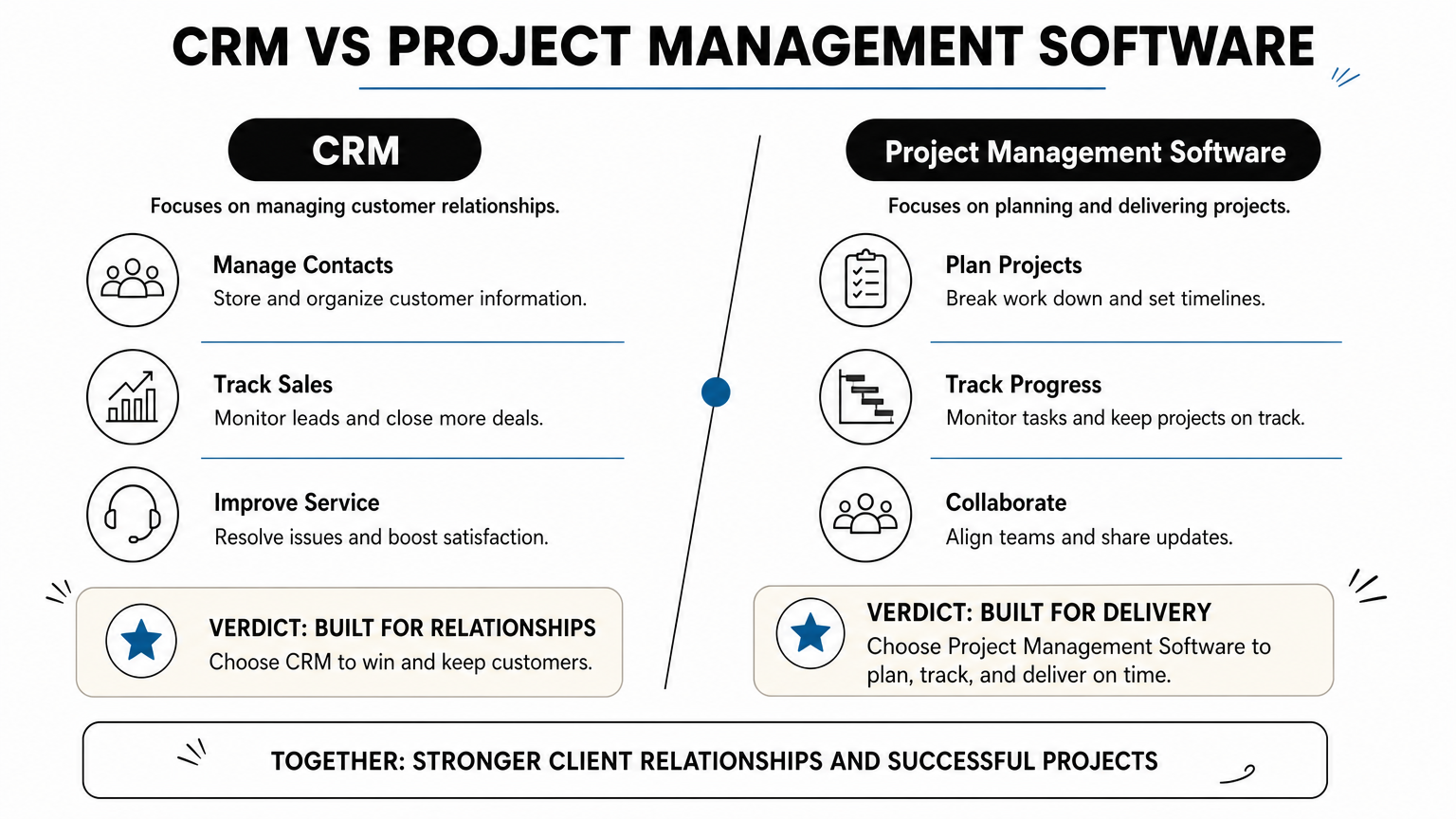
A CRM answers "who do we sell to and where’s the deal," while project management software answers "what work is left and who’s doing it."
Here’s a quick side-by-side to make the distinction concrete:
| Function | CRM | Project Management Software |
|---|---|---|
| Primary record | Contact or company | Task or project |
| Core view | Sales pipeline / deal stages | Timeline, board, or Gantt chart |
| Tracks | Emails, calls, quotes, deal value | Milestones, dependencies, hours |
| Owned by | Sales and account management | Operations and delivery teams |
| Reports on | Win rate, pipeline value, forecast | On-time delivery, workload, budget burn |
The gap shows up the moment a deal closes. Sales marks it won, but nobody automatically creates the delivery project, assigns tasks, or sets deadlines. Someone has to manually re-key the client’s details, the scope, and the contract value into a second system. That handoff is where projects start late, scope details go missing, and clients get asked the same questions twice.
Project management software with CRM built in, or tightly synced through native integrations, closes that gap. When a deal moves to
2. QuikeFix Enterprise ERM for unified operations
QuikeFix Enterprise ERM is built for businesses that are tired of stitching a CRM to a project tool with Zapier and hoping the sync holds. Rather than treating sales and delivery as separate products, it organizes your whole operation into six connected domains: Operations, Commercial, Finance, People, Management, and Administration. A won deal in the Commercial area flows straight into Operations as a live project, with the client record, quote value, and scope attached automatically.

How it works
Deals, quotes, and client communication live in the Commercial module, while tasks, timelines, and workforce visibility sit in Operations, all reading from the same underlying data. When a sales rep closes an opportunity, the platform can spin up the delivery project without anyone re-typing the client’s details into a second system. Finance and administration stay linked too, so invoicing and margin tracking reflect the same job record from quote to close.
When your CRM and your project tracker are the same system, nothing gets lost between winning the deal and doing the work.
Who it’s for
This suits South African businesses running multiple operational functions (sales, service delivery, finance, workforce) that want one login instead of three subscriptions. It fits companies that have outgrown a basic CRM-plus-Trello setup and need genuine cross-department visibility, including freight, logistics, and service-based operators already familiar with freight forwarding and clearing ERP.
Pricing
QuikeFix Enterprise ERM is currently available for roadmap discussions, demos, and early-access assessments, so pricing and engagement is scoped to your operational footprint rather than sold off a fixed price list.
3. HubSpot for sales-led teams with light PM needs
HubSpot built its name as a CRM and marketing platform, and its project management layer still feels like an add-on rather than a core feature. That’s fine if your business is sales-led, where the pipeline matters more than tracking every task dependency. Teams already living inside HubSpot for deals, email sequences, and marketing automation get basic task boards bundled in without buying a separate tool.
How it works
HubSpot’s project management functionality runs through its Tasks and, for higher tiers, a lightweight Projects board tied to deal records. When a deal closes, you can trigger a task list or notify a project owner, but there’s no native Gantt chart, no resource capacity view, and no dependency mapping. Most teams end up connecting HubSpot to Asana or ClickUp through its app marketplace once delivery work gets complex.
HubSpot keeps your sales data clean, but treat its task tools as a supplement, not a replacement, for real project management.
Who it’s for
This fits marketing and sales teams that need strong pipeline visibility and email tracking, with only simple follow-up tasks after a deal closes, such as consultancies handling a handful of active clients rather than dozens of concurrent projects.
Pricing
HubSpot’s CRM tools start free, with paid Sales Hub tiers from roughly $20 per seat monthly, and Projects features gated behind Professional and Enterprise plans that push costs well past $500 monthly for growing teams.
4. Monday CRM for visual sales-to-delivery workflows
Monday CRM sits on top of the same visual board engine that made Monday.com popular for project tracking, so switching between sales pipeline and delivery board feels seamless rather than like jumping apps. Boards, timelines, and automations are the same building blocks whether you’re tracking a deal or a task, which is why teams already using Monday for projects often add the CRM module instead of buying a separate sales tool.
How it works
Every deal lives on a customizable board with stages, deal value, and contact fields, and you can convert a closed-won deal into a project board with one click, carrying over the client name, notes, and files. Automations handle the handoff: when a deal status changes, Monday can auto-assign a project owner and notify the delivery team. Custom dashboards then pull sales and delivery data into one view.
Monday’s real strength is visual consistency: your sales board and your project board look and behave the same way, so nothing gets lost in translation.
Who it’s for
This fits teams that already think in boards and columns and want their CRM and project management software to share one visual language, particularly marketing agencies and small operations teams juggling client work alongside internal projects.
Pricing
Monday CRM starts around $12 per seat monthly on Basic, with Standard and Pro tiers (roughly $17 to $28 per seat) adding automations, forecasting, and advanced reporting needed for real sales-to-delivery workflows.
5. Zoho for automating sales and project workflows
Zoho built its reputation on Zoho CRM, then extended it with Zoho Projects, and the two now share contact records, deal data, and custom modules across its broader Zoho One suite. Businesses already running Zoho Books or Zoho Desk get an easier path here, since everything sits inside the same ecosystem rather than bolted on through third-party connectors.
How it works
Zoho CRM and Zoho Projects connect through native workflow automation, called Blueprints, that trigger project creation the moment a deal status changes. You define the rule once (deal marked "Closed Won" creates a project from a template) and every future deal follows it without manual setup. Fields map automatically, so client name, deal value, and notes carry across, and Zoho Analytics can then report on sales and delivery data side by side.
Zoho’s automation rules mean your team stops re-entering client details every time a deal closes.
Who it’s for
This suits businesses that want crm and project management software bundled with finance, help desk, and inventory tools under one vendor, particularly teams comfortable configuring workflows themselves rather than waiting on a vendor’s implementation team. It’s a strong fit for growing SMEs that expect to add more Zoho apps over time.
Pricing
Zoho CRM starts around $14 per user monthly on Standard, with Zoho Projects priced separately from roughly $4 per user monthly. Bundling both through Zoho One costs about $37 per user monthly, which is usually cheaper than buying each app alone once you pass a handful of seats.
6. Insightly for turning deals into live projects
Insightly markets itself squarely as CRM and project management software built for one purpose: converting a won opportunity into a tracked project without a second data entry pass. It’s smaller than HubSpot or Zoho, but that focus shows in how tightly its pipeline and project modules actually connect, rather than feeling like two products stapled together.
How it works
Opportunities in Insightly’s pipeline can be configured to auto-generate a project the moment a deal is marked won, pulling across the contact, organization, deal value, and any custom fields you’ve mapped. Project templates then apply a standard task list, so a closed deal doesn’t sit waiting for a project manager to build a plan from scratch. Milestones and task dependencies track progress from there, with reports that link back to the original deal record.
Insightly’s whole pitch is that the deal and the delivery project are the same record, just viewed at different stages.
Who it’s for
Smaller teams and consultancies that sell a repeatable service, like fixed-scope onboarding or implementation packages, get the most value here, since project templates only pay off when your delivery work follows a predictable pattern. Businesses wanting something lighter than Zoho’s full app suite but more integrated than HubSpot’s task bolt-on tend to land on Insightly.
Pricing
Insightly’s CRM starts around $29 per user monthly on its Plus plan, with project management features bundled in from that tier rather than sold as a separate add-on, which simplifies budgeting for smaller teams.
7. Wrike for CRM-linked project execution at scale
Wrike doesn’t try to be a CRM itself. Instead, it positions its enterprise-grade project execution engine as the delivery layer that plugs into whatever CRM your sales team already runs, whether that’s Salesforce, HubSpot, or Microsoft Dynamics. That distinction matters if you’ve got a mature sales stack you don’t want to rip out, but you need serious project tracking for the work that follows.
How it works
Custom request forms and pre-built connectors pull deal data straight from your CRM into a Wrike folder, complete with client fields, contract value, and attached files. From there, Wrike’s Gantt charts, resource allocation views, and workload heatmaps take over, giving delivery managers a level of scheduling detail most native CRM project tools can’t match. Two-way sync means updates in Wrike can push status changes back to the CRM record, so sales keeps visibility without opening a second tool.
Wrike trades CRM features for execution depth, so pair it with a CRM you already trust rather than expecting it to replace one.
Who it’s for
Larger operations teams, marketing departments, and professional services firms managing dozens of concurrent client projects get the most from Wrike, especially where project management software with CRM integration needs to survive audits and complex approval chains. Small teams with simple pipelines will find it overbuilt.
Pricing
Wrike’s Team plan starts around $10 per user monthly, with Business tier (roughly $24.80 per user) required for CRM integrations, custom workflows, and advanced reporting most growing teams need.
8. Bitrix24 for all-in-one CRM and project management
Bitrix24 packs CRM, project management, chat, telephony, and even a basic website builder into one platform, aiming to replace a whole stack of separate subscriptions. It’s the closest thing on this list to a true all-in-one CRM and project management suite, and its free tier is generous enough that many small South African businesses run their entire client and task workflow on it without paying a cent, at least until they need ERP software built for growing South African businesses.
How it works
Deals in the CRM pipeline convert into tasks or full projects with a few clicks, carrying contact details and deal value across automatically. Gantt charts, kanban boards, and scrum tools sit alongside the CRM module, so delivery teams pick whichever view suits the work, while sales stays in the pipeline view. Built-in chat and video calling mean client conversations happen in the same place as the deal record and its linked tasks.
Bitrix24 bets that most small teams would rather have one crowded platform than five tidy ones.
Who it’s for
This suits budget-conscious small businesses that want CRM, task tracking, and internal communication under one login, particularly teams willing to tolerate a steeper learning curve in exchange for not paying for five separate tools.
Pricing
Bitrix24’s free plan supports unlimited users with core CRM and project features, while paid plans start around $61 monthly per organization (not per seat) for Basic, scaling up through Standard and Professional tiers for larger teams and automation limits.
9. Teamwork for agencies managing clients and projects
Teamwork was built by an agency for agencies, and that heritage shows in how tightly it links client records to billable work. Rather than treating CRM as an afterthought, Teamwork CRM ships as a companion product that shares contacts and deal data with Teamwork’s project management core, so a signed proposal can become a scoped project without a fresh data entry pass.
How it works
Deals won in Teamwork CRM trigger project creation through templates that carry over the client name, contract value, and scope notes. Time tracking, budgets, and profitability reports then tie back to that same client record, which matters when you’re billing by the hour or need to see margin per account. Task lists, milestones, and workload views round out the delivery side, giving project managers the scheduling depth agencies actually need.
Teamwork’s edge is billing and profitability tracking baked into the project itself, not bolted on as a separate finance tool.
Who it’s for
Agencies, consultancies, and professional services firms billing clients by retainer or hourly rate get the clearest benefit here, since project management software with CRM built around time tracking and profitability reporting solves a real gap most generalist tools ignore. Teams without billable hours will find features they never use.
Pricing
Teamwork’s project management plans start around $10.99 per user monthly on Starter, with Teamwork CRM sold separately from roughly $15 per user monthly, and Grow or Scale tiers needed for full profitability and resource reporting.
10. Trello for lightweight boards with CRM add-ons
Trello is the simplest tool on this list, and that’s exactly the point. It’s a kanban board, nothing more out of the box, so any CRM functionality comes from Power-Ups (Trello’s add-on marketplace) rather than a built-in sales pipeline. If your team already lives on Trello for task tracking and just needs a lightweight way to track client deals alongside it, this is the cheapest route to project management software with crm features without switching platforms entirely.
How it works
You add a CRM Power-Up, such as Salesforce Sync or a dedicated CRM board template, which turns cards into contact or deal records with custom fields for deal value and stage. Automation rules (Trello calls this Butler) can move a card to a "Won" list and auto-create a linked project board, but the connection between sales and delivery data stays shallow compared to purpose-built tools. There’s no native reporting on pipeline value or forecast accuracy; you’re building that yourself with Power-Ups or exporting to a spreadsheet.
Trello works as CRM and project management software only if your sales process is simple enough to fit on a card.
Who it’s for
Freelancers, solo consultants, and very small teams with a handful of active clients get the most value here, especially those who already prefer boards to forms and don’t need forecasting or deal-stage reporting.
Pricing
Trello’s Free plan covers basic boards and limited Power-Ups per board, while Standard runs about $5 per user monthly and Premium around $10, both needed to unlock enough Power-Ups and automation to run a workable CRM setup.
11. How to choose the right CRM and project management platform
Picking between nine tools comes down to one question: where does your data need to live first, sales or delivery? Sales-heavy teams with simple project needs should lean toward HubSpot or Monday CRM, where the pipeline is the star and task tracking is a bonus. Delivery-heavy teams juggling complex timelines and resourcing should look at Wrike or Teamwork, where execution depth matters more than deal-stage polish.
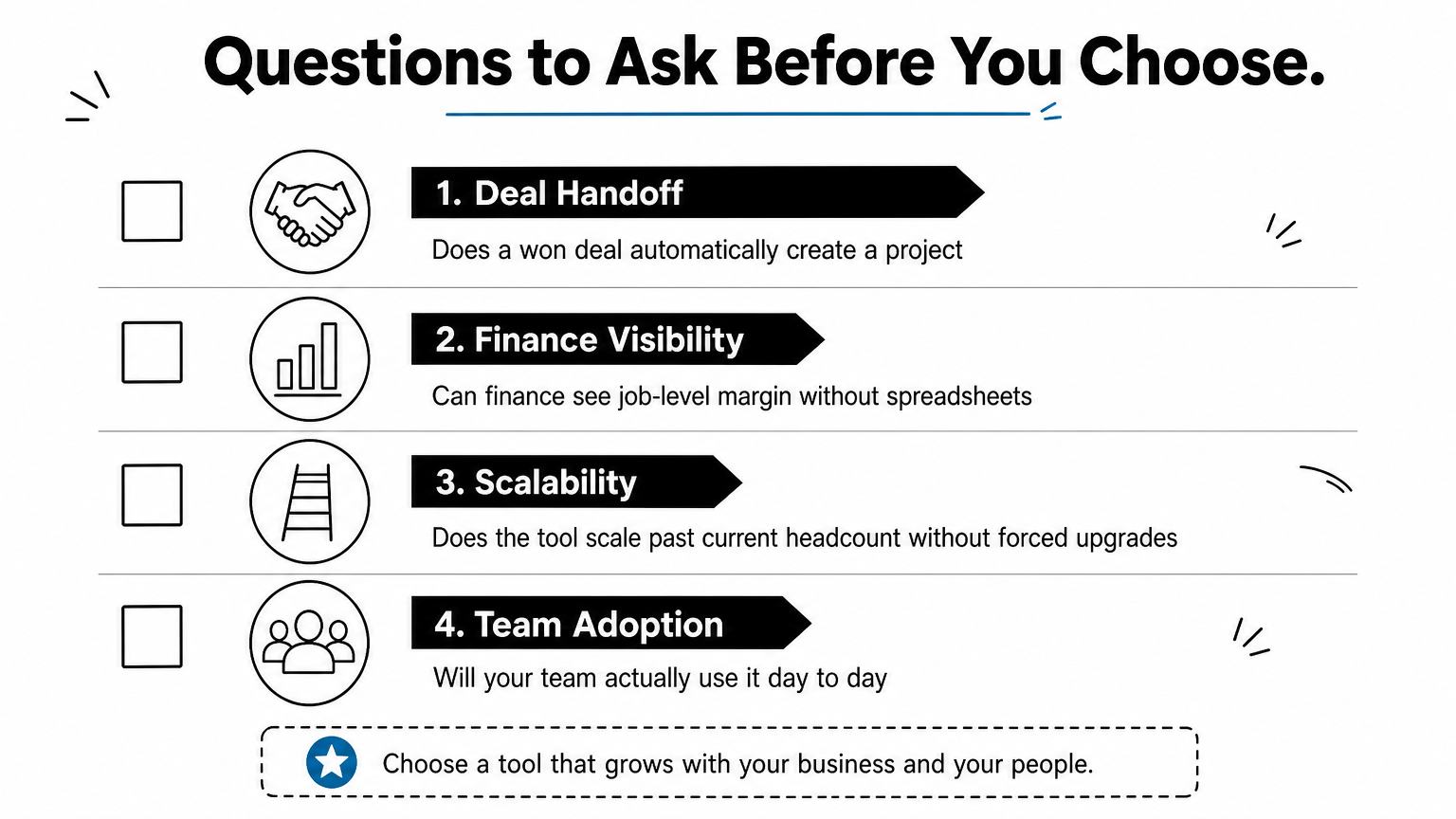
Budget and team size narrow the list fast. A five-person consultancy doesn’t need Wrike’s workload heatmaps, and a 50-person operation will outgrow Trello’s Power-Ups within a year. Before you commit, run through this checklist:
- Does a won deal automatically create a project, or will someone re-key client details every time?
- Can finance see job-level margin without exporting data to a spreadsheet, and does the tool support quotation and credit approval controls?
- Does the tool scale past your current headcount without forcing a plan upgrade that changes the workflow?
- Will your team actually use it, or does it demand a steeper learning curve than the problem justifies?
The right platform isn’t the one with the most features, it’s the one where nobody has to copy a client’s details twice.
Finally, weigh how much you value having one vendor accountable for the whole workflow versus stitching together a CRM, a project tool, and practical workflow automation ideas that might break. That single decision shapes whether you’re buying a tool or building a system, and it’s usually the difference that shows up in your renewal decision twelve months from now.
Finding the right platform for your team
Every tool on this list solves the same core problem differently: getting your sales data and your delivery work to talk to each other without someone copying details between two logins. HubSpot and Monday CRM suit sales-led teams, Wrike and Teamwork suit delivery-heavy operations, and Bitrix24 or Trello work when budget matters more than depth. Project management software crm platforms only earn their keep when a won deal turns into a scoped project automatically, with finance, sales, and delivery reading from the same record.
QuikeFix Enterprise ERM takes that logic further by connecting sales, operations, finance, and workforce visibility into one system rather than two tools synced through a third. If you’re tired of stitching subscriptions together and want a single partner who scales with you, request a demo of our enterprise relationship management software and see what unified operations actually looks like for your team.