Picking the wrong ERP costs you more than money. It costs you months of retraining staff, migrating data, and explaining to your board why production schedules still don’t match what’s happening on the floor. If you’re comparing top 10 erp software for manufacturing options right now, you already know the stakes: production planning, inventory accuracy, and financial reporting all live or die by this one decision.
This list ranks the best manufacturing erp software available in 2026 based on how well each system handles shop floor control, supply chain visibility, and compliance, not just marketing claims. We looked at pricing models, implementation timelines, and how each platform performs for South African manufacturers dealing with local tax, customs, and reporting requirements alongside international supply chains.
At QuikeFix, we build and implement operational platforms daily, including our own unified Enterprise ERM platform connecting finance, operations, and supply chain into one workspace. That hands-on experience shaped this comparison of erp software for manufacturers, so you get a practical, no-nonsense breakdown rather than a repackaged vendor brochure. Read on to find the system that actually fits your production reality.
1. SAP S/4HANA Cloud
SAP built its reputation on running the world’s largest factories, and S/4HANA Cloud carries that legacy into a subscription model. This is the system you reach for when your production network spans multiple countries, currencies, and regulatory regimes, and you need one source of truth tying it all together. It’s not a lightweight tool, and SAP doesn’t pretend otherwise. You’re buying the same engine that runs global automotive and industrial supply chains, scaled down (slightly) for mid-market and enterprise manufacturers.

Key features for manufacturers
Manufacturers choose S/4HANA Cloud for its real-time production planning engine, which recalculates material requirements and capacity constraints as orders change rather than waiting for an overnight batch run. The embedded analytics layer, built on SAP’s HANA in-memory database, gives plant managers live dashboards on yield, scrap rates, and machine utilization without exporting data to a separate BI tool. Quality management, predictive maintenance, and advanced variant configuration for made-to-order products all ship as native modules, not bolted-on add-ons.
- Advanced planning and scheduling (APS) with what-if simulation
- Embedded IoT connectivity for machine and sensor data
- Multi-plant, multi-currency financial consolidation
- Built-in compliance frameworks for industries like automotive and life sciences
If your production complexity outgrows spreadsheets and generic accounting software, S/4HANA Cloud is built to absorb that complexity without buckling.
Best for
S/4HANA Cloud fits large or fast-scaling manufacturers running discrete or process manufacturing across multiple sites, especially those with existing SAP infrastructure or plans to standardize on one global ERP backbone. Automotive suppliers, industrial equipment makers, and chemical or pharmaceutical producers with strict traceability needs get the most value here. Smaller manufacturers with a single plant and straightforward bills of materials usually find it overbuilt for their needs.
Pricing
SAP prices S/4HANA Cloud per user, per month, with costs typically starting around $3,000 to $8,000 monthly for mid-sized implementations, though enterprise deployments with multiple plants and modules run considerably higher. Implementation projects often run six to eighteen months and require certified consultants, which adds to the total cost of ownership beyond the subscription itself. SAP doesn’t publish flat rate cards publicly; you’ll need a scoped quote based on user count, modules, and deployment complexity, so budget time for that sales cycle before committing. Check SAP’s own S/4HANA Cloud page for current packaging details before requesting a demo.
2. Oracle NetSuite ERP
NetSuite built its name in the cloud before most competitors had a cloud product at all, and manufacturers benefit from that maturity today. Unlike SAP’s on-premise roots, NetSuite runs entirely as a native cloud ERP, which means no server hardware to manage and updates that roll out automatically twice a year. Mid-sized manufacturers who want modern architecture without the multi-year implementation timeline tend to land here first when researching erp software for manufacturers.
Key features for manufacturers
NetSuite’s manufacturing edition combines work orders, bills of materials, and routing directly with its core financials, so production costs flow into your general ledger without manual reconciliation. The platform’s real-time inventory visibility spans multiple warehouses and locations, which matters if you’re shipping finished goods across provinces or exporting internationally.
- Multi-level bill of materials and routing management
- Demand planning tied directly to sales orders and forecasts
- Built-in multi-currency and multi-subsidiary consolidation
- SuiteAnalytics for custom dashboards without IT tickets
NetSuite’s biggest advantage is speed to value: you get financials, inventory, and production planning talking to each other from day one, not after a year of integration work.
Best for
Growing manufacturers with revenue between roughly $10 million and $250 million fit NetSuite’s sweet spot, particularly those already running multiple entities or subsidiaries. Companies expanding internationally appreciate the built-in multi-currency handling, and it suits discrete manufacturers more than heavy process industries with complex batch chemistry.
Pricing
Oracle NetSuite prices through an annual license fee plus per-user access charges, typically starting around $999 monthly for the base platform plus $99 to $129 per user monthly. Manufacturing-specific modules add to that base, and total costs vary widely based on user count and modules activated. Visit Oracle’s NetSuite pricing page for a tailored quote.
3. Microsoft Dynamics 365
Microsoft built Dynamics 365 to feel familiar to anyone who’s used Excel or Outlook, and that design choice pays off during user adoption. Rather than one monolithic system, Dynamics 365 ships as modular apps, Finance, Supply Chain Management, and Business Central among them, that you combine based on what your plant actually needs. Manufacturers already running Microsoft 365 or Azure infrastructure get the smoothest onboarding here, since single sign-on and data connections come pre-wired.
Key features for manufacturers
Supply Chain Management, the module most manufacturers deploy, handles production scheduling across discrete, process, and lean manufacturing modes from one interface. Power BI ships natively, so plant managers build custom dashboards on scrap rates or throughput without waiting on a report request. The Copilot AI layer now surfaces demand forecasts and reorder suggestions directly inside the workflow, cutting the manual analysis that used to eat up a planner’s morning.
- Mixed-mode manufacturing (discrete, process, lean) in one system
- Native Power BI and Power Automate integration
- IoT-enabled predictive maintenance through Azure
- Business Central option for smaller manufacturing sites
Dynamics 365 wins on integration depth if your finance, sales, and shop floor teams already live inside Microsoft’s ecosystem.
Best for
Mid-market to large manufacturers already invested in Microsoft tools, particularly those running mixed production modes across multiple sites, get the most value. It also suits companies wanting a phased rollout, starting with Business Central at a single plant before scaling into the full Supply Chain Management suite as operations grow.
Pricing
Microsoft prices Dynamics 365 per user, per app, per month, with Supply Chain Management starting around $180 and Business Central starting near $70 for essentials. Costs scale with the number of apps combined and users licensed, so a full manufacturing deployment typically lands well above the entry price. Check Microsoft’s official Dynamics 365 pricing page for current tiers before scoping your project.
4. Infor CloudSuite Industrial
Infor built CloudSuite Industrial (formerly SyteLine) specifically for discrete and mixed-mode manufacturers, not as a generic ERP retrofitted with production modules. That focus shows in how the system handles configure-to-order and engineer-to-order workflows, two production styles that trip up broader ERP suites designed around standard inventory. Manufacturers running complex, low-volume, high-variation orders often find CloudSuite Industrial matches their reality better than platforms built for high-volume repetitive manufacturing.
Key features for manufacturers
Infor’s strength sits in its configure-to-order engine, which handles product variants and custom bills of materials without forcing you to create a new item master for every configuration. The platform includes native scheduling tools built around finite capacity planning, so production sequencing accounts for actual machine and labor availability rather than theoretical capacity. Infor also embeds its Coleman AI layer for demand forecasting and quality alerts, plus a mobile-friendly interface for shop floor data capture.
- Advanced configure-to-order and engineer-to-order support
- Finite capacity scheduling tied to real shop floor conditions
- Embedded AI (Coleman) for forecasting and anomaly detection
- Infor OS platform for integrating third-party applications
CloudSuite Industrial earns its keep with manufacturers whose products rarely look the same twice.
Best for
Mid-sized industrial manufacturers producing complex, configurable, or made-to-order equipment get the most value here, particularly machinery builders, industrial equipment producers, and metal fabricators. Companies running highly repetitive, low-variation production usually find simpler platforms cheaper and easier to maintain.
Pricing
Infor doesn’t publish flat pricing; CloudSuite Industrial runs on a subscription model priced per user with costs shaped by modules, deployment size, and industry configuration. Expect implementation timelines of four to nine months for mid-sized deployments. Visit Infor’s official CloudSuite Industrial page for a scoped quote based on your operation.
5. Epicor Kinetic
Epicor built Kinetic on decades of experience serving discrete manufacturers, and the platform still carries that shop-floor DNA even after its cloud rebuild. Formerly known as Epicor ERP, Kinetic keeps the deep manufacturing logic that industrial buyers trust while adding a modern, low-code interface on top. Manufacturers who’ve outgrown entry-level accounting software but don’t want SAP-level complexity often land on Kinetic as their middle ground.
Key features for manufacturers
Kinetic’s production management core handles job costing, routing, and material planning with a level of granularity built specifically for makers of physical products, not adapted from generic business software. Its low-code application studio lets internal teams build custom screens or workflows without waiting on Epicor’s development queue, which speeds up plant-specific tweaks. The platform also ships with embedded IoT data collection through Epicor’s Advanced MES, giving supervisors real-time machine status alongside order progress.
- Job and process manufacturing support in one system
- Low-code configuration for plant-specific workflows
- Embedded IoT and machine monitoring via Advanced MES
- Built-in CRM and field service modules
Kinetic rewards manufacturers who want deep production functionality without needing a full-time integration team to customize it.
Best for
Mid-sized discrete manufacturers, particularly in metals, industrial equipment, and electronics, get the strongest fit here. Companies wanting a single vendor for production and field service management also benefit, since Kinetic bundles both without separate licensing complexity.
Pricing
Epicor prices Kinetic through annual subscriptions scaled by user count and modules, with mid-sized deployments commonly running into the low six figures annually once implementation is included. Exact figures depend heavily on deployment scope, so request a scoped quote through Epicor’s official Kinetic ERP page before budgeting.
6. IFS Cloud
IFS built its reputation on asset-heavy industries, and IFS Cloud carries that lineage into one platform covering ERP, enterprise asset management (EAM), and field service alongside standard manufacturing functions. Manufacturers running equipment-intensive plants, where machine uptime matters as much as production output, gravitate toward IFS because it treats maintenance and service as first-class citizens rather than afterthought modules bolted onto a generic ERP core.
Key features for manufacturers
IFS Cloud’s asset-centric architecture connects production schedules directly to maintenance windows, so planners see equipment downtime risk before it derails a job. The platform’s component-based deployment model lets you activate only the modules your plant needs, avoiding the bloat that slows down some enterprise systems. Manufacturers with mixed production and service revenue streams, think equipment builders who also service what they sell, get native support for both without stitching together separate systems.
- Combined ERP, EAM, and field service management in one platform
- Component-based deployment to activate only relevant modules
- Strong lifecycle management for capital equipment producers
- Built-in scheduling that accounts for both production and maintenance constraints
IFS Cloud stands out for manufacturers whose products don’t stop mattering once they leave the factory floor.
Best for
IFS suits mid-to-large manufacturers producing capital equipment, industrial machinery, or aerospace and defense components, particularly those bundling long-term service contracts with product sales. Companies managing large fleets of physical assets alongside production get more value here than pure discrete manufacturers with simple make-and-ship models.
Pricing
IFS Cloud runs on a subscription model priced per user, with no published flat-rate card since costs shift based on modules activated and deployment scale. Mid-sized manufacturing implementations typically require a six to twelve month rollout, and IFS works through certified partners for most deployments rather than direct self-service signup. Visit IFS’s official IFS Cloud manufacturing page for a scoped quote matched to your production setup.
7. Acumatica Cloud ERP
Acumatica built its licensing model around resource consumption rather than user headcount, which changes the math for growing manufacturers who’d otherwise pay more every time they add a shop floor employee to the system. The platform runs true cloud-native architecture with an open API layer, so manufacturers already running specialized tools for CAD, quality, or shipping can connect them without ripping out existing investments. That flexibility has made Acumatica a favorite among mid-market manufacturers who want modern software without Microsoft or SAP’s per-seat pricing headaches.
Key features for manufacturers
Acumatica’s unlimited user pricing means you can put the system in front of every supervisor, planner, and floor worker without recalculating your license bill each time. The manufacturing edition covers bill of materials, routing, scheduling, and estimating in one module, with real-time costing that updates as materials and labor post against a job. Its open architecture also supports rapid third-party integration, useful for manufacturers running barcode scanning or MES tools from other vendors.
- Unlimited named users under a resource-based license
- Multi-mode manufacturing: make-to-stock, make-to-order, engineer-to-order
- Real-time production costing and variance tracking
- Open API for connecting existing shop floor tools
Acumatica’s pricing model rewards manufacturers who want the whole plant using the system, not just office staff.
Best for
Growing mid-market manufacturers, particularly those with distributed teams or multiple facilities needing broad system access, get the most value here. Companies already running specialized shop floor tools they want to keep, rather than replace, also find Acumatica’s open integration approach a better fit than more closed enterprise systems.
Pricing
Acumatica prices based on resource consumption tiers rather than per-user fees, with typical mid-sized manufacturing deployments starting around $2,000 to $5,000 monthly depending on modules and transaction volume. Visit Acumatica’s official manufacturing edition page for a scoped quote based on your operation’s size.
8. Odoo Manufacturing
Odoo takes a different approach than every system above it: instead of buying one manufacturing suite, you assemble your ERP from dozens of interconnected apps, only paying for what you actually use. The open-source core keeps licensing costs low compared to enterprise competitors, while the paid Enterprise edition adds hosting, support, and advanced manufacturing features. Manufacturers who want to start small and grow into a fuller system, without committing to a six-figure rollout upfront, often find Odoo the most approachable entry point on this list.
Key features for manufacturers
Manufacturing in Odoo revolves around its Manufacturing Order workflow, which links work orders, bills of materials, and routing directly to inventory and sales in real time. Quality checkpoints, maintenance requests, and barcode scanning all live inside the same interface, so shop floor staff aren’t switching between disconnected tools. Odoo’s PLM app also handles engineering change orders cleanly, a feature smaller competitors often skip entirely.
- Modular apps: Manufacturing, Inventory, Quality, Maintenance, PLM
- Barcode-based shop floor data capture
- Built-in MRP scheduling with reordering rules
- Extensive third-party and custom module ecosystem
Odoo works best when you treat it as a platform to configure, not a finished product to install.
Best for
Small to mid-sized manufacturers with straightforward production processes, and tighter budgets, get the strongest value here. Businesses wanting custom Odoo development, like tailored dashboards or unique approval workflows, should work with an experienced implementation partner such as QuikeFix’s custom business app development team to avoid configuration mistakes.
Pricing
Odoo prices Enterprise apps per user monthly, starting around $24.90 per app, with Manufacturing plus Inventory typically running $50 to $80 per user monthly once bundled. Implementation costs vary widely depending on customization depth.
9. Sage X3
Sage built X3 for mid-market manufacturers who need more depth than entry-level accounting software but don’t want the price tag or implementation timeline that comes with SAP or Oracle. The platform has quietly become a strong contender among manufacturing erp software options for companies running process or discrete manufacturing across several countries, since Sage baked multi-legislation compliance into the core rather than treating it as a regional add-on. You’ll find X3 running food and beverage plants, chemical producers, and industrial goods manufacturers who value speed of deployment over enterprise-scale complexity.
Key features for manufacturers
Sage X3 handles batch and lot traceability natively, which matters for food, pharmaceutical, and chemical manufacturers facing recall or audit requirements. The platform’s production planning module recalculates schedules against material availability and machine capacity, while its embedded business intelligence tool builds plant dashboards without exporting data elsewhere.
- Multi-country legislation and currency handling built-in
- Batch traceability with expiry and recall management
- Configurable workflows without heavy custom coding
- Fast implementation compared to tier-one enterprise ERPs
Sage X3 fits manufacturers who need serious traceability and compliance features without an enterprise-scale price tag.
Best for
Mid-sized manufacturers in regulated industries, food and beverage, chemicals, and industrial goods, get the most value from X3, particularly companies operating across multiple countries but not yet at true enterprise scale. Businesses wanting faster go-live timelines than SAP or Oracle typically offer also find X3 a comfortable middle ground.
Pricing
Sage prices X3 through annual subscriptions based on user count and modules, with mid-sized manufacturing deployments commonly starting in the $150 to $200 per user monthly range. Implementation adds to that baseline, so request a scoped quote through Sage’s official Sage X3 page before budgeting your rollout.
10. Katana Manufacturing ERP
Katana built its platform for small manufacturers who need real production visibility without the overhead of a full enterprise system. The tool markets itself around a live inventory view, showing raw materials, work in progress, and finished goods on one visual dashboard that updates as orders move through the shop. Founders running small batch or made-to-order production, think craft food, furniture, or specialty electronics, often pick Katana because it solves the exact problem they hit once spreadsheets stop working: knowing what you can actually sell right now.

Key features for manufacturers
Manufacturers get a visual production planner that shows every open work order against current material stock, flagging shortages before they stall a batch. Katana connects natively to Shopify, WooCommerce, and Amazon, so sales orders trigger manufacturing tasks automatically instead of requiring manual entry between systems.
- Drag-and-drop production scheduling
- Real-time raw material and finished goods tracking
- Native e-commerce and accounting integrations (QuickBooks, Xero)
- Barcode scanning for shop floor updates
Katana earns its spot by giving small manufacturers enterprise-style visibility without an enterprise budget or timeline.
Best for
Small manufacturers and makers selling direct-to-consumer or through a handful of retail channels get the most value here, especially those running light assembly or batch production rather than complex multi-level bills of materials. Companies already selling online through Shopify or similar platforms fit particularly well, since Katana was built around that connection.
Pricing
Katana prices through monthly subscription tiers starting around $199 monthly for the Starter plan, scaling to $399 and higher for Professional tiers with more advanced production features. Visit Katana’s official pricing page for current tier details before signing up.
11. Manufacturing ERP features you shouldn’t skip
No matter which platform you shortlist, a handful of capabilities separate a system that actually runs your plant from one that just tracks invoices with a manufacturing label slapped on top. Skip these and you’ll be bolting on spreadsheets and side tools within six months, right back where you started.
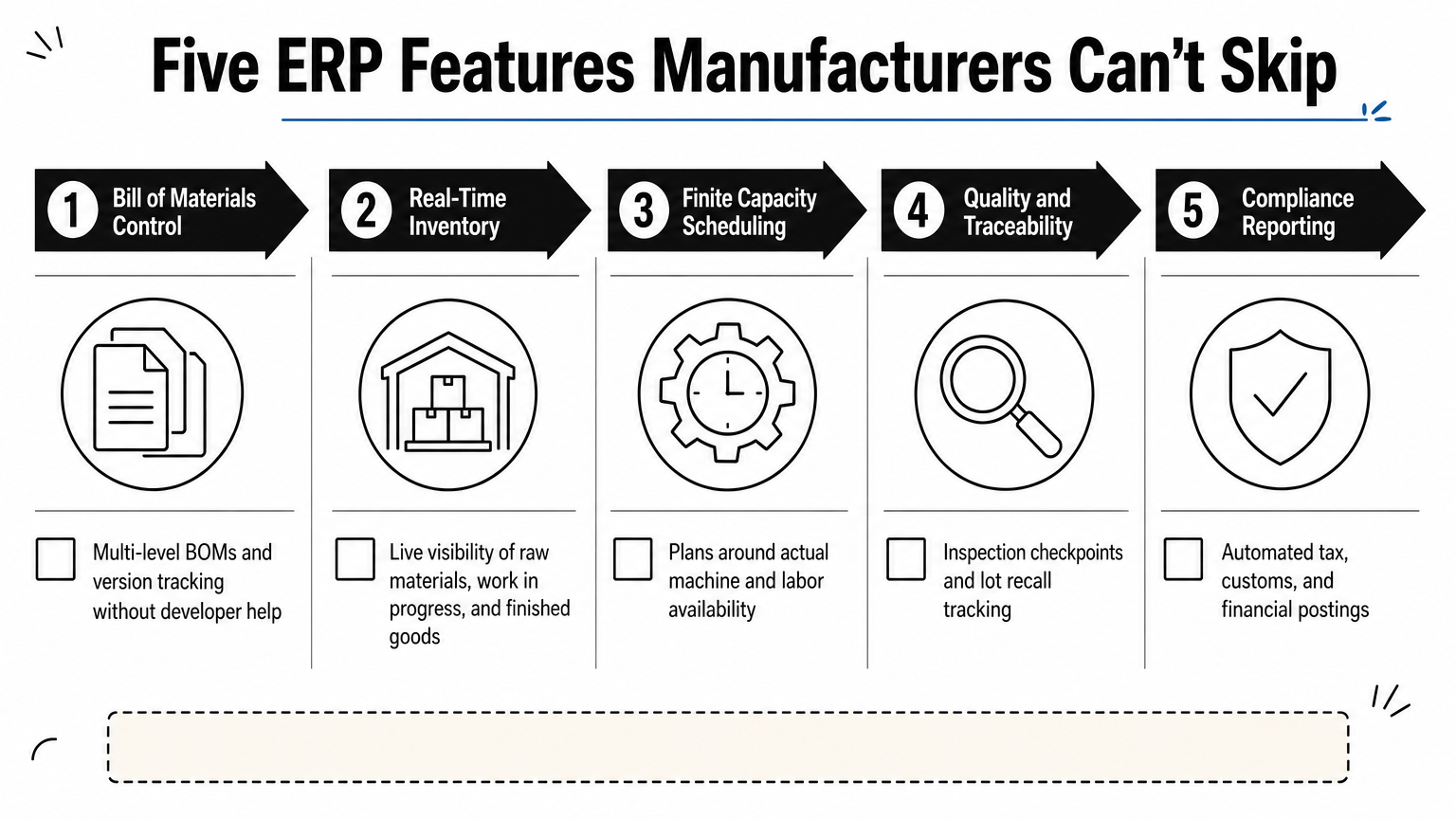
Bill of materials management sits at the top of that list. Your ERP needs to handle multi-level BOMs, engineering change orders, and version control without a developer rewriting queries every time a product spec changes. Real-time inventory tracking across raw materials, work in progress, and finished goods matters just as much, since guessing at stock levels leads directly to missed shipments and idle machines.
A manufacturing ERP that can’t show you what’s on the shop floor right now isn’t a manufacturing ERP, it’s an accounting package wearing a costume.
Beyond those basics, check for:
- Finite capacity scheduling that accounts for actual machine and labor availability, not theoretical capacity
- Quality management with inspection checkpoints tied to specific work orders and lots
- Traceability and lot control, essential if you’re in food, pharma, or anything facing recall risk
- Financial integration so job costs post to the general ledger automatically, without manual journal entries
- Compliance-ready reporting, including SARS EDI customs integration and tax data if you’re moving goods across South African borders
Any erp software for manufacturers worth considering should cover all five without forcing you into a third-party add-on for core functionality. If a vendor can’t demonstrate live inventory updates or job costing during a demo, that’s a red flag worth pressing on before you sign anything.
12. How to choose the right manufacturing ERP
Narrow your shortlist by starting with production type, not vendor reputation. Discrete manufacturers assembling distinct units, process manufacturers running batches or continuous lines, and mixed-mode operations all need different scheduling logic, and a system built for one struggles with the others. Match your production model first, then filter vendors by which ones actually specialize there.
Budget honestly for the full cost, not just the license fee. Implementation, data migration, training, and ongoing support often double or triple the sticker price you see on a pricing page, so ask every vendor for a total cost of ownership estimate covering the first three years, not just year one.
Consider your team’s technical capacity next. A low-code platform like Epicor Kinetic or Odoo rewards manufacturers with someone internal who can build workflows and reports, while a rigid enterprise system like SAP demands certified consultants for even minor changes. Be realistic about who’s maintaining the system after the implementation partner leaves.
The best manufacturing ERP is the one your production team will actually use correctly, not the one with the longest feature list.
Run a structured evaluation before you sign anything:
- Demo the system with your actual bill of materials and production scenarios, not the vendor’s canned example
- Ask current customers in your industry about implementation timelines and support responsiveness
- Confirm the platform handles your compliance needs, including South African tax and customs reporting if you’re moving goods across borders
- Check integration options for tools you’re already using, like accounting software or e-commerce platforms
- Verify the vendor’s roadmap matches where your business is headed, not just where it is today
Getting this evaluation right upfront saves you from a costly mid-implementation pivot later.
Finding the right fit for your operation
Every system on this list can run a factory. None of them can run yours without the right fit between production type, budget, and team capacity. SAP and Oracle suit complex, multi-plant operations with deep pockets. Odoo and Katana suit smaller manufacturers who need real visibility without an enterprise price tag. The best manufacturing erp software for you sits somewhere in that range, and only your production reality can tell you where.
Don’t let vendor marketing decide this for you. Demo with your own bill of materials, price out the full three-year cost, and confirm the platform handles South African compliance requirements before you sign anything.
If you’d rather talk through your specific operation with people who implement these systems daily, see how ERP software for South African businesses works at QuikeFix and book a roadmap discussion for a straight answer on what actually fits.